Osu mania V2 remix
Osu mania V2 remix: More Than One Track
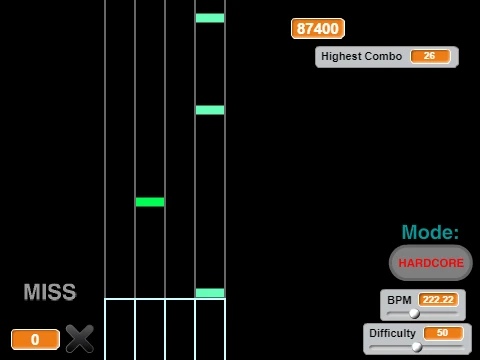
Here we have "Osu mania V2 remix". If the V3 version was a customized gateway, this V2 remix feels like a more packaged, feature-ready product. The key detail that sets it apart? You can change the music and the difficulty right there inside the game. No backing out to a menu. Just hit the "mode button" and switch things up. It’s perfect for when you can’t decide what you’re in the mood for, or you need to cool down after a failed attempt.
The control scheme here is the classic D F J K spread. This is a very common and comfortable key layout for rhythm game players, sitting nicely under your left and right hands. The core rule remains: "Press the D,F,J or K buttons when the notes fall on them to the beat." Timing is still king. But the ability to swap the entire track makes this a great little playlist player.
Key Features to Note:
- The coveted "Mode Button". Use it to cycle through the available songs and difficulty levels without restarting the game.
- The DFJK layout is a staple for a reason. It’s ergonomic and separates the hand responsibilities clearly.
- This is a self-contained experience. Multiple maps, multiple challenges, all in one place.
- It captures the essence of what people often do in the full game: jump between a few favorite tracks to warm up or relax.
This kind of accessible, multi-song package is what leads to those great osu! moments. Discovering that your favorite childhood song has been perfectly mapped by a genius. Nostalgia meets skill check. When the music and mapping finally sync up in your brain, transforming from chaos to simple geometry. The physical sensation of a perfect alternating stream—fingers dancing without conscious thought. And the warm-up phase: 30 minutes of feeling like you’ve never played before, then suddenly unlocking god mode. Also, buying your first tablet and watching your rank plummet for two weeks as you relearn everything. A necessary pain.
Maybe you’re a "vibe" player who chooses maps based on music and visual aesthetics, and this game’s song-swapping feature is your jam. Or you’re at a LAN party or gaming café with friends and want something quick and switchable to pass around. Your objective could be to improve accuracy from 95% to 97%+ across all the included tracks. Perhaps you're throwing in the constraint of playing with only one hand for a ridiculous extra test. Let's explain this like a technical guide optimizing settings.
Speaking of settings and gameplay, have you considered how to manage your cursor speed/sensitivity? Or what "flow aim" vs "snap aim" is? Or how to warm up effectively before playing? These fundamentals apply even in a remixed browser game.