Osu Mania
Osu Mania: A Free Web-Based Rhythm Game
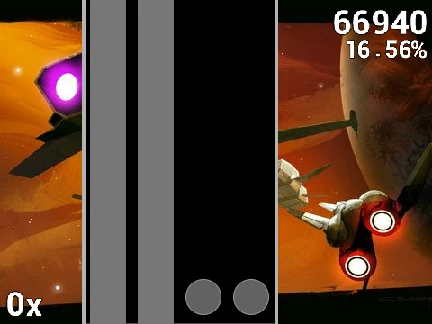
This is an accessible, browser-based implementation of the popular osu!mania game mode. It provides a genuine way to enjoy the core rhythm gameplay without any software installation, making it perfect for quick sessions or for newcomers to get a feel for the genre.
Gameplay Instructions & Controls
The objective is classic: hit the notes as they fall down four columns and align with the stationary receptors at the bottom. The default keys for these columns are D, F, J, and K. For extended circles with a white tail, you need to press and hold the key for the note's entire duration, releasing only when it ends. If you wish to exit a map immediately, simply press the P key. A key feature is the fully customizable controls; you can change any key binding in the game's options to match your preferred setup.
Tips for the Best Experience
To ensure smooth gameplay, consider these tips:
- Reduce Lag: For better performance and a stable 60 FPS, you can run the game through an alternative player at forkphorus.github.io/#220672247.
- Disable Fancy Score: Turning off this graphical option in the settings can further improve game fluidity.
- Start Easy: The song "Anemone" on Beginner difficulty is highlighted as the easiest map, ideal for practicing the basics.
- Explore Further: The description encourages players to download the official, full-featured osu! client for the complete experience.
Adding Custom Beatmaps
For players wanting to expand their song library, this version supports importing custom osu! mania beatmaps. The process involves taking the content of a standard .osu file and converting it by replacing all newline characters with '\\n'. This modified text is then pasted into the import function of the "map manager" sprite within the project. Remember, you must also separately add the corresponding audio file (the song), background image, and a song selection button sprite for your custom creation to be fully playable.